

Search results
Price:
£0 - £117







Loading…
How to Redeem a Steam Game Key: Complete UK Activation Guide (2026)
Bought a game key but not sure where to enter it? You are in the right place. Whether you just picked up a cheap key from a reseller or received a gift link from a friend, activating it on Steam takes less than two minutes once you know where to look.
This guide walks you through every method of Steam key activation, covers the most common errors and how to fix them, and explains what to watch out for when buying keys from third-party sites. By the end, you will know exactly what to do with your code, regardless of where you bought it.
What Is a Steam Game Key?
A Steam game key is a 15 to 25 character alphanumeric code, usually formatted as XXXXX-XXXXX-XXXXX, that permanently unlocks a game on your Steam account. Once redeemed, it lives in your library forever, tied to your account just like a direct Steam purchase.

There are three main types of Steam codes worth knowing about before you start:
Product keys are the most common. They activate base games, DLC packs, and expansions directly to your library.
Gift links are redeemable invitations sent from another Steam user. Clicking the link while logged in lets you accept the game into your library or gift inventory.
Steam Wallet codes add credit to your Steam balance rather than unlocking a specific game. These are redeemed through a slightly different menu.
One practical tip before you do anything else: copy and paste your key rather than typing it manually. A single transposed character will trigger an invalid key error and send you on an unnecessary troubleshooting detour.
Where to Buy Steam Keys Safely
Steam keys are sold in a lot of places, and the quality and legitimacy of those sources varies considerably. Here is a straightforward breakdown.
Official and fully safe sources include the Steam store itself, publisher storefronts such as Ubisoft Connect, EA App, and Square Enix, and well-established authorised resellers including Humble Bundle, Fanatical, and Green Man Gaming. Keys from these sources are clean, region-appropriate for your account, and backed by proper customer support if something goes wrong.
Reputable third-party resellers such as CDKeys (now Loaded) and Instant Gaming offer legitimate keys at prices below Steam RRP. These sites source keys through regional pricing and bulk arrangements. They are widely used and have strong Trustpilot records, but it is always worth checking the listed activation region before purchasing to confirm the key will work on your account.
Grey-market platforms such as G2A and Kinguin are peer-to-peer marketplaces where individual sellers list keys. The platform itself does not own or verify the keys. While many transactions go fine, the risk of receiving a revoked, already-used, or region-locked key is meaningfully higher. In several documented cases, game developers have revoked large batches of keys that originated from fraudulent card purchases, leaving buyers with nothing. If a price looks too good to be true, it usually is.
Regardless of where you buy, always pay with a method that offers buyer protection, keep your purchase confirmation email, and check the vendor's refund policy before completing the transaction.
How to Redeem a Steam Key
On the Desktop App (PC or Mac)
- Open the Steam client and sign in to your account
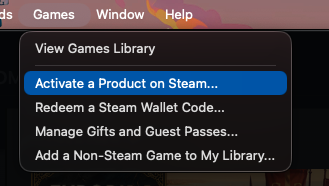
- Click Games in the top menu bar
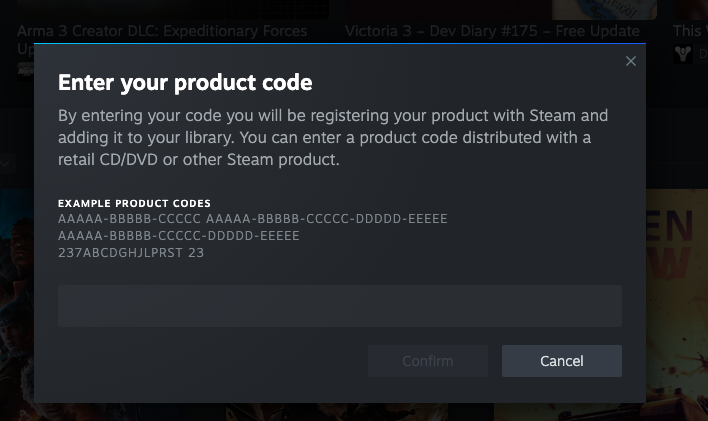
- Select Activate a Product on Steam
- Read and accept the subscriber agreement
- Enter your key and click Next
- Confirm the product details and click Finish
The game will appear in your library immediately. You can install it straight away or leave it for later.
On the Steam Website
- Go to store.steampowered.com and sign in
- Click your account name in the top right corner
- Select Account Details
- Click Add a game at the bottom left of the page
- Choose Activate a Product on Steam
- Enter your key and confirm
On the Steam Mobile App
- Open the Steam app on iOS or Android
- Tap Store in the bottom navigation
- Tap your account icon and go to Account
- Select Redeem a Steam Key
- Enter your key and confirm
Redeeming Different Types of Steam Codes
Product Keys
Follow the standard steps above. This covers base games, DLC, expansion packs, and in-game items tied to a Steam product.
Gift Links
If someone sends you a Steam gift link, click it while you are logged into your Steam account. You will be given the option to accept the game directly into your library or hold it in your gift inventory to activate later.
Steam Wallet Codes
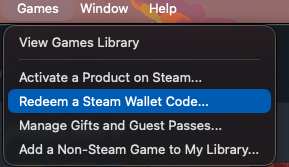
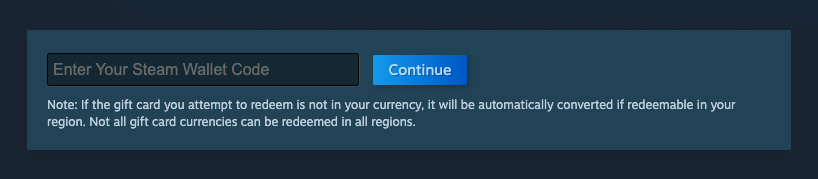
Wallet codes use a slightly different redemption path. In the desktop client, go to Games then Redeem a Steam Wallet Code. On the website, go to your account page and look for Add funds to your Steam Wallet. The credit will appear in your balance immediately.
Region Locks and Currency Issues
This is the area that catches the most buyers off guard, so it is worth understanding before you purchase a key rather than after.
Region-locked keys are only redeemable in specific countries or regions. An EU-only key will not activate on a UK account in some cases, and keys sold for specific markets like Southeast Asia or South America are typically locked to those regions entirely. Always check the activation region listed on the product page of whichever site you are buying from. Reputable resellers label this clearly. If it is not stated, ask before buying.
Currency mismatches most commonly affect Steam Wallet codes. If your Steam account is set to GBP and you purchase a wallet code in EUR, it may not redeem correctly.
Account restrictions can affect new accounts or accounts flagged for suspicious activity. If you have just created a Steam account, some redemptions may be limited for a short period.
Common Errors and How to Fix Them
Invalid or already used key: Start by double-checking the code itself, paying particular attention to easily confused characters like 0 and O, or 1 and I. If the key is correct and still invalid, contact the seller with your purchase confirmation. If you bought from a reputable reseller this is usually resolved quickly.
Wrong platform: Steam keys only work on Steam. If you purchased a key for Ubisoft Connect, Epic Games, GOG, or another platform, it will not activate on Steam regardless of what game it is for. Check the platform listed on your confirmation email.
Region error: Unfortunately there is no workaround for a region-locked key that does not match your account. The only routes are requesting a refund or replacement from the vendor, or a region swap if the reseller offers one. This is why checking the region before purchasing matters.
Support escalation: If the vendor cannot resolve the issue, Steam Support can sometimes assist, particularly if there is evidence of fraudulent key distribution. Always keep your purchase confirmation as evidence.
What Happens After You Activate
Once a key is redeemed, the game is permanently added to your Steam account. You can install it immediately from your library by selecting it and clicking Install, choosing your preferred drive, and letting it download.
A few things worth knowing for the longer term:
Games remain tied to your account permanently. Removing a game from your library view does not remove your licence or delete the game. You can re-download it at any time.
Steam's standard refund policy covers purchases made directly through Steam within two hours of playtime and 14 days of purchase. Keys activated from third-party resellers fall under the vendor's own refund policy, not Steam's. This is another reason to buy from resellers with a clear, accessible return process.
Once activated, a key cannot be resold, transferred, or gifted to another account.
Frequently Asked Questions
Can I redeem a Steam key from another country?
Yes, if it is listed as a global key. Region-locked keys will fail outside their specified region. Always confirm the region on the product page before purchasing from any third-party source.
Why does Steam say my key is invalid?
The most common causes are a typo in the code, a key that has already been redeemed, or a key purchased from a fraudulent seller. Copy-pasting the code eliminates the first cause. If the code is correct and unused, contact the seller with your proof of purchase.
How do I use a Steam gift link?
Click the link while you are signed into your Steam account. You will be prompted to accept the game into your library or gift inventory.
Are cheap game keys safe to buy?
They can be, provided you buy from a reputable reseller with a verified track record. Keys priced significantly below RRP from unknown sellers carry real risk. See our full reseller trust guide for a breakdown of which sites are worth using.
Can I resell or transfer a game key once it is activated?
No. Once a key has been redeemed it is permanently and exclusively tied to the Steam account that activated it. There is no way to move it to another account or resell it.
How long does activation take?
Instantly. Once you confirm the key, the game appears in your library within seconds.
- Guide last updated March 2026. Steam's interface and menu locations are subject to change. If a menu path listed above does not match what you see, check Steam's official support documentation for the most current instructions.